

WordPress Technical SEO: Boost Performance and Rankings
Many businesses rely on WordPress to run their websites. It is flexible, widely supported, and easy to manage. Despite these advantages, WordPress sites often struggle to perform well in search results because of technical issues that are easy to overlook.
Even small technical problems like: crawl barriers, indexing conflicts, or slow page performance can limit how search engines interpret a website. Addressing these issues often improves visibility before any major content or link-building strategy begins.
Ensuring Search Engines Can Crawl the Site
Search engines must be able to crawl a website before they can evaluate and rank its pages. WordPress sites sometimes develop crawl problems due to plugin conflicts, unnecessary redirects, or poorly structured navigation.
A technical review usually includes checking:
- Robots.txt configuration
- XML sitemap accuracy
- Redirect chains or loops
- Crawl depth for important pages
- Internal link paths

For Example:
An auto repair business might struggle to rank locally if search engines cannot access key service pages. By ensuring proper robots.txt settings, fixing redirect loops, and improving internal links, such a business could help search engines discover and rank its most important pages.
Resolving Indexing Problems
Crawling and indexing are related but distinct. A page may be crawlable yet fail to appear in search results if it is not indexed properly.
Common WordPress indexing issues include:
- Noindex settings left active in SEO plugins
- Duplicate content from tags or archive pages
- Conflicting canonical tags
- Thin or redundant category pages

For Example:
A wellness studio with duplicate content from blog categories or improperly set canonical tags could prevent their service pages from appearing in local search. Correcting these indexing issues ensures search engines understand which pages represent primary content.
Improving Page Speed and Performance
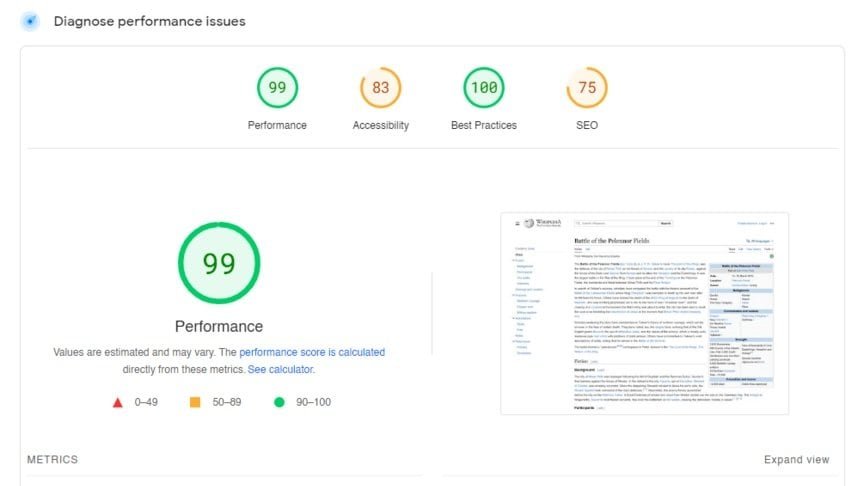
Website performance influences both search rankings and user experience. WordPress sites often slow down due to large images, excessive plugins, or unoptimized themes.
Common technical improvements:
- Compressing and properly sizing images
- Implementing caching
- Reducing unused scripts and styles
- Optimizing hosting performance
For Example:
A local café with a WordPress site may see improved engagement and search visibility simply by optimizing images, enabling caching and removing unnecessary plugins. Pages load faster, reducing bounce rates and improving local search performance.
Implementing Structured Data
One important element of a strong technical SEO foundation is structured data.Structured data provides context that helps search engines understand content. Many WordPress sites lack schema markup or rely only on default plugin settings. Adding schema markup to your WordPress site helps search engines understand your content and display rich results. Learn more about how to implement structured data in our guide on Structured Data for WordPress Sites.
Common uses for structured data:
- Local business information
- Services and offerings
- Articles and blog posts
- Frequently asked questions

Illustrative Example:
A landscaping company could use structured data to highlight service areas, client testimonials, and FAQs. This helps search engines display rich results and increases the likelihood of being found in local searches.
Strengthening Internal Linking
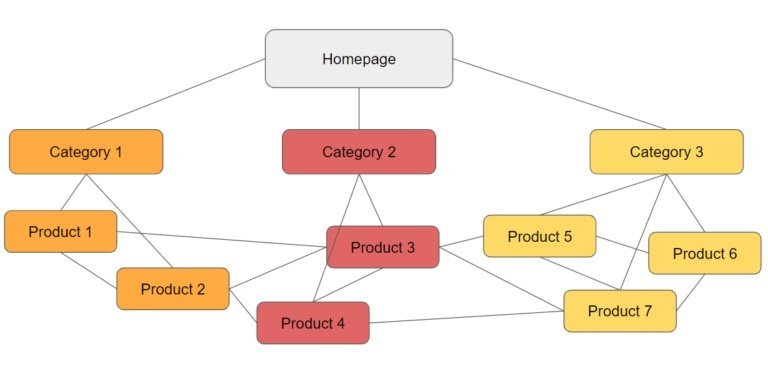
Internal linking helps search engines evaluate site structure and understand the relationship between pages. Many small business websites rely primarily on navigation menus, leaving key pages buried several clicks from the homepage.
Improvement strategies:
- Linking relevant blog content to service pages
- Adding contextual links within articles
- Organizing content around clear topic relationships
For Example:
An accounting firm might link blog posts about tax tips directly to their main service pages. This distributes authority throughout the site and signals to search engines which pages are most important.
Building a Strong Technical Foundation
Search engine optimization is often associated with content and backlinks, but those efforts rely on a solid technical foundation. WordPress provides flexibility, but that flexibility introduces complexity.
A WordPress SEO professional focuses on the systems that influence crawling, indexing, performance, and structured data. Once these elements are properly configured, businesses have a stronger platform for organic growth and long-term visibility.